
Using Kubernetes as a reverse proxy
Using Kubernetes as the reverse proxy of choice, for non-kubernetes services.
Manifest driven. Source controlled. Redundant. And, DNS records get provisioned automatically as you add or remove services.
Example configuration:
  # ---- media ----
  - {name: plex,       host: plex.kube.xtremeownage.com,     ip: 192.168.5.10,  port: 32400}
  - {name: dupeguru,   host: dupeguru.kube.xtremeownage.com, ip: 192.168.5.2,   port: 7801}
  - {name: filebot,    host: filebot.kube.xtremeownage.com,  ip: 192.168.5.2,   port: 7813}
Info
I know its been a minute since I have written a post!
It has been very busy around here. I am hoping to start the next solar project soon, which will be very exciting to share.
Preface
My reverse proxy is an important part of my lab. It is the user-exposed front end for most of my services.
As such, I prefer a solution which is easy to configure, version controlled, and redundant.
My requirements-
- Source/Version controlled. It's always nice to see what particular changes were made.
- SINGLE stop configuration.
- This means, no need to manually add/set DNS records.
- Single location to manage.
- Must support multiple cluster / proxy solutions.
- Ideally, this solution would be scalable to support multiple clusters and/or solutions.
- Wildcard DNS points at a single reverse proxy.
- Can handle items with invalid SSL certificates.
- It happens.
Well, Why don't you just use Nginx Proxy Manager
I do use it. However, it's not source controlled. And, it's not clustered.
WELL, You can ansible and python and make all of that happen!
And I could also just write my own solution too. Yet, here we are.
Why Kubernetes?
Well, I have it. It's deployed in my lab. And I really enjoy the manifest driven nature of kubernetes.
Since, kubernetes typically has a built in gateway / ingress controller, and the gateway / ingress is typically hosted across your pool of nodes… It's quite redundant.
As well, everything you place into kubernetes, is manifest based. This means, everything can be easily imported, exported, backed up, etc…
Requirements
- A DNS Server which either supports RFC2136, OR one of the other External-DNS Supported Providers
- I will be using Technitium DNS for this. I am a big fan of it, would give it my recommendation…
- AND it now supports SSO/OIDC, as well as extremely easy to cluster.
- I will be using its RFC2136 support
- A functional Kubernetes Cluster
- If, you don't have one and/or have not used kubernetes, this article is not going to help you much.
- I will be using my Talos cluster, which is 100% deployed/maintained via terraform (and argo after coming up).
- This post is written using the Gateway API. If you are still using Ingress, you will need to adapt manifests to your environment.
- Argo CD (Or, your preferred flavor of Gitops/CD tool)
- A git repository.
- Given, one of the requirements, is source controlled… Having a central repository is rather important.
- I will be using Gitea
- You can use any solution, which is compatible with git. Github… Forgejo, Azure DevOps. Gitlab. Doesn't matter.
Getting started
Configure your external DNS Provider
Create TSIG Key
In Technitium, go to Settings > TSIG
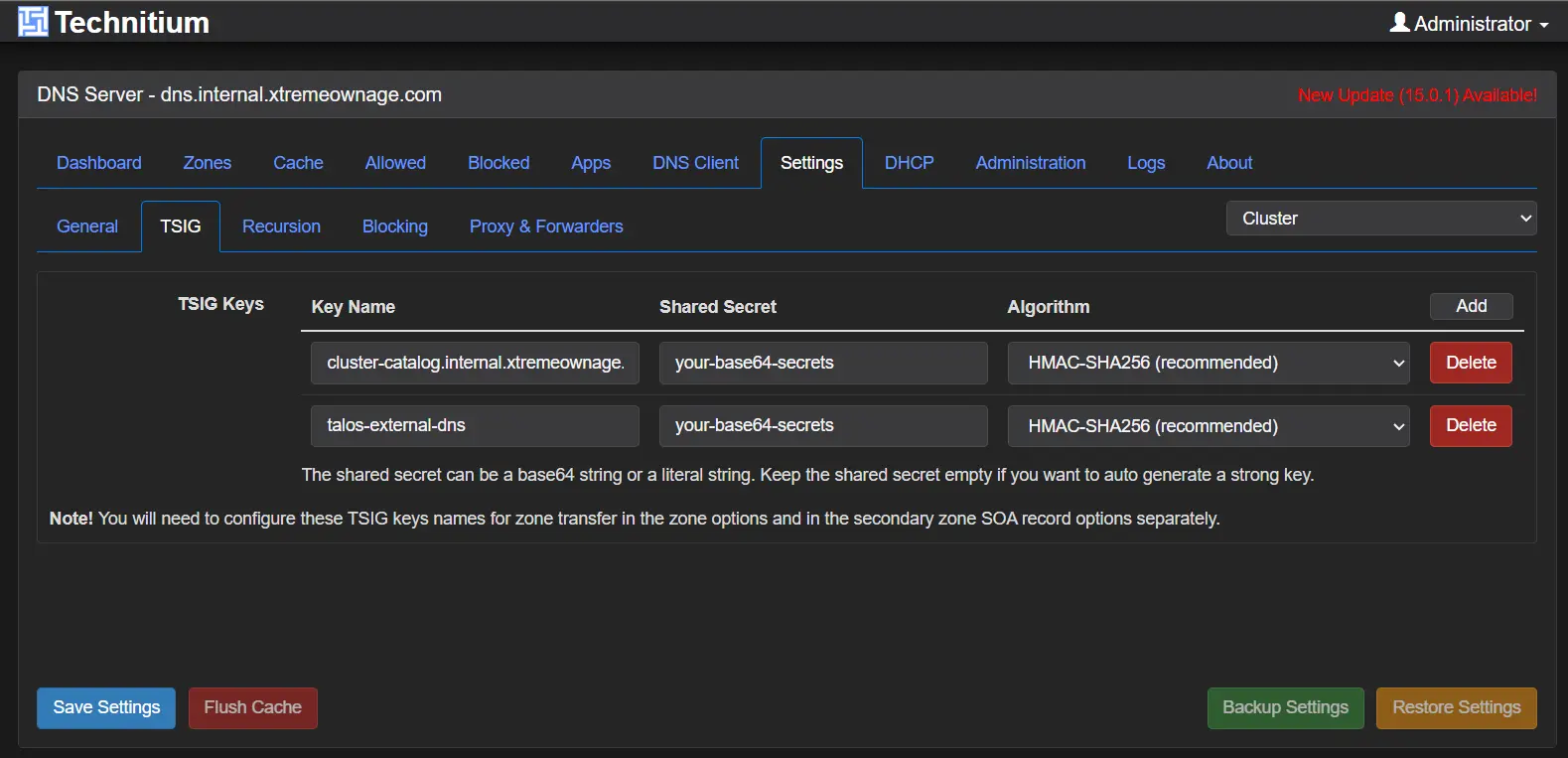
You will need to create a new key. Leave the shared secret field blank, and a base64 string will be automatically generated for you upon save.
I named my key: talos-external-dns
Ensure HMAC-SHA256 is selected.
Configure DNS Zone
Next, browse to the DNS zone you wish to allow your cluster to manage/update. You can perform this step to multiple zones.
I will be using the subdomain, kube.xtremeownage.com as this is where I have been hosting many of my services.
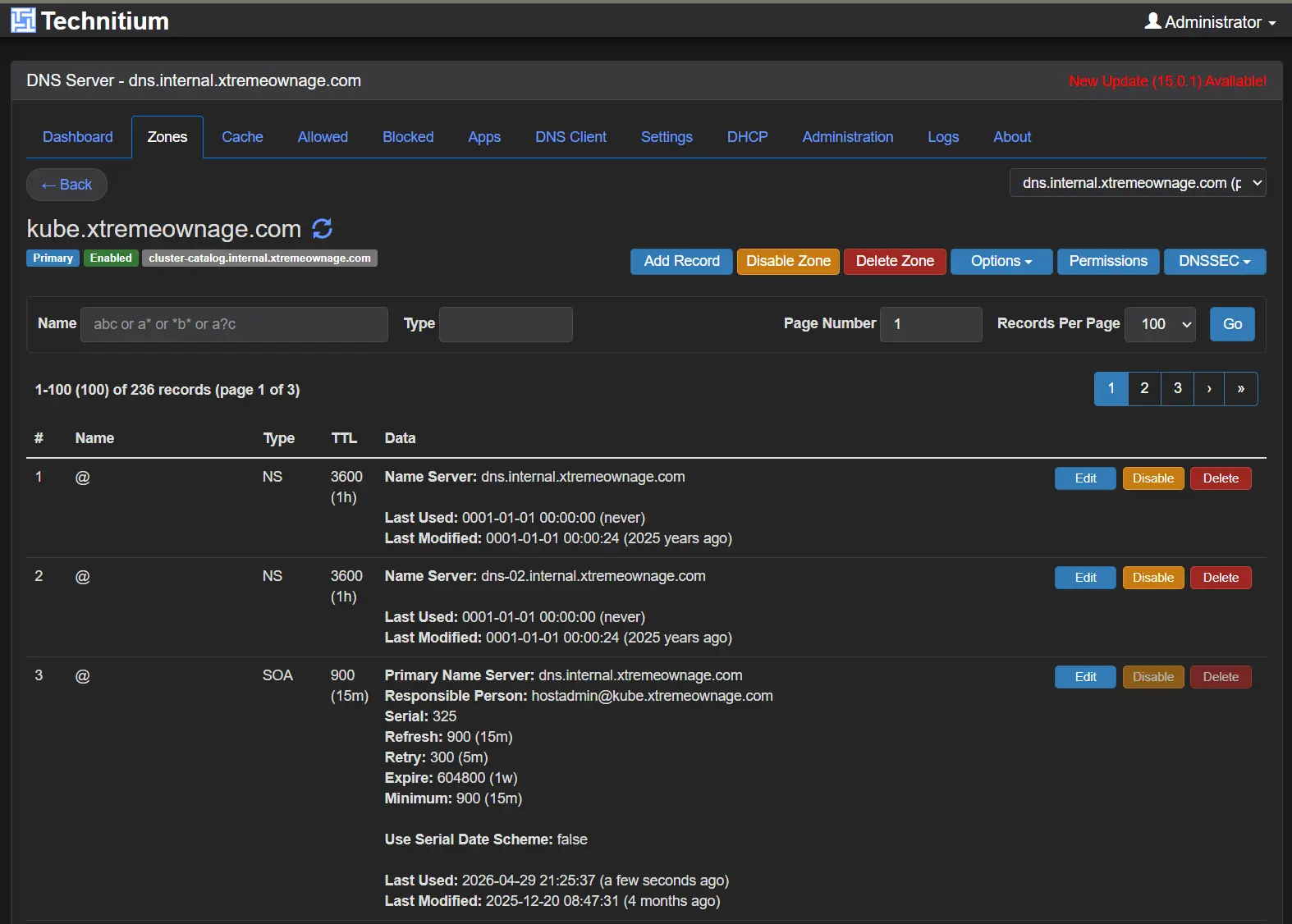
Click Options > Zone Options. Select the ‘Dynamic Updates (RFC2136)’ tab.
First, select your access policy.
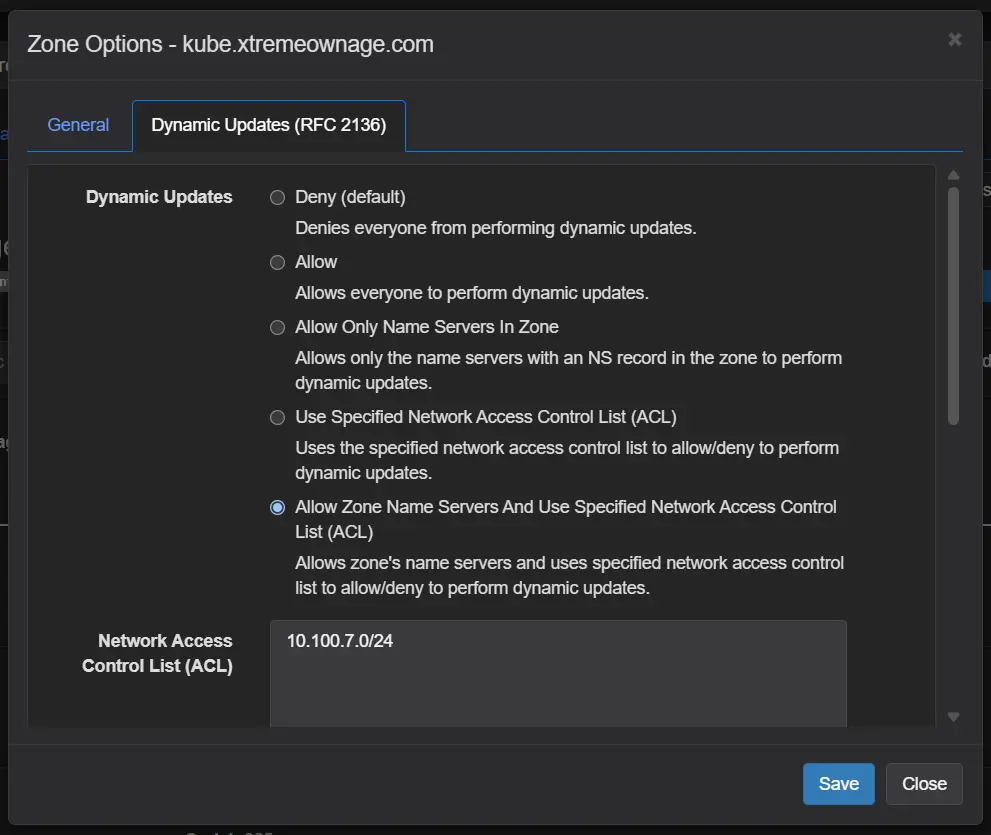
I selected to only allow name servers within a specific subnet and registered name servers.
The particular subnet used contains all of my current and future kubernetes nodes.
Next, scroll down to the security policy tab. Here, you will need to add your key, and choose which, and what type of records it is allowed to update.
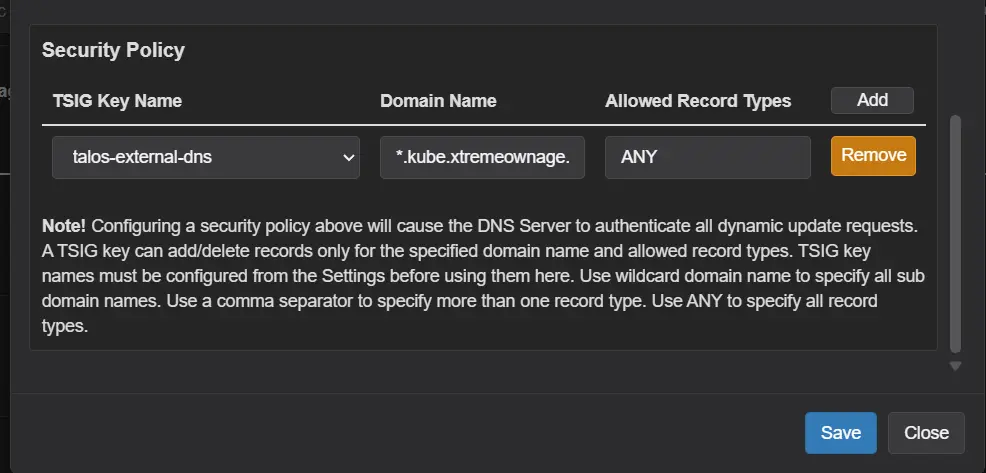
As I want to delegate the entire *.kube.xtremeownage.com domain, I specified *.kube.xtremeownage.com. You can choose specific names, subdomains. etc.
For allowed record types, I chose ANY. If you wish to lock this down, at a minimum choose A, TXT.
Save your changes. Time to move to kubernetes.
Configure Kubernetes
Deploy External-DNS Manifests
The first step, is to deploy external DNS. As, I used argo to do this, here are the applicable manifests:
apiVersion: argoproj.io/v1alpha1
kind: Application
metadata:
  name: external-dns
  namespace: argocd
  annotations:
    argocd.argoproj.io/sync-wave: "-80"
  finalizers:
    - resources-finalizer.argocd.argoproj.io
spec:
  project: networking
  sources:
    - repoURL: https://kubernetes-sigs.github.io/external-dns/
      chart: external-dns
      targetRevision: 1.15.0
      helm:
        releaseName: external-dns
        valueFiles:
          - $source/manifests/networking/external-dns/values.yaml
    # This record is used as an alias. $source in the above line, refers to the below entry, identified by the ref field.
    # Note, you will need to put YOUR repo URL here.
    - repoURL: https://yourgitrepo.yourdomain.com/yourorg/yourreponame.git
      targetRevision: main
      ref: source
    # This source, will contain the configurations for the "reverse proxy"
    - repoURL: https://yourgitrepo.yourdomain.com/yourorg/yourreponame.git
      targetRevision: main
      path: manifests/networking/external-dns/resources
  destination:
    server: https://kubernetes.default.svc
    namespace: external-dns
  syncPolicy:
    managedNamespaceMetadata:
      labels:
        xtremeownage.com/app: external-dns
        backup-policy: no-backup
    automated:
      prune: true
      selfHeal: true
      allowEmpty: false
    syncOptions:
      - CreateNamespace=true
      - PruneLast=true
      - ServerSideApply=true
Please be sure to add the correct repo and path structure for your git repository. It can be as simple, or as complex as you want.
You can have a simple git repo, with all of the files in the root, if you prefer.
# https://artifacthub.io/packages/helm/external-dns/external-dns

namespaceOverride: external-dns

provider:
  name: rfc2136

# Watch HTTPRoutes (Gateway API) and Services. Ingress is unused in this
# cluster but harmless to leave on.
sources:
  - gateway-httproute
  - service
  - ingress

managedRecordTypes:
  - A
  - AAAA
  - CNAME
  - PTR

policy: sync
registry: txt

txtOwnerId: talos-cluster
# Yes- I know it's misspelled. Alphabetically, these come at the end.
# This was literally done on purpose to default-sort the txt records at the end when viewing records.
txtPrefix: xternal-dns-

domainFilters:
  - kube.xtremeownage.com
  - rke.xtremeownage.com

# You can provide multiple zones here. It's quite flexible.
# See https://artifacthub.io/packages/helm/external-dns/external-dns
extraArgs:
  - --rfc2136-host=192.168.5.128
  - --rfc2136-port=53
  - --rfc2136-zone=kube.xtremeownage.com
  - --rfc2136-tsig-secret-alg=hmac-sha256
  - --rfc2136-tsig-keyname=talos-external-dns
  - --rfc2136-tsig-axfr

env:
  - name: EXTERNAL_DNS_RFC2136_TSIG_SECRET
    valueFrom:
      secretKeyRef:
        name: external-dns-tsig
        key: tsig-secret

serviceMonitor:
  enabled: true

resources:
  requests:
    cpu: 25m
    memory: 64Mi
  limits:
    cpu: 100m
    memory: 128Mi

podLabels:
  app.kubernetes.io/part-of: networking
apiVersion: kustomize.config.k8s.io/v1beta1
kind: Kustomization
resources:
  - ./namespace.yaml
  - ./tsig-secret.yaml
You don't need a namespace crd, as argo can handle creating the namespace just fine. But- I do it to keep the labels stored near the manifests.
apiVersion: v1
kind: Namespace
metadata:
  name: external-dns
  labels:
    xtremeownage.com/app: external-dns
    backup-policy: no-backup
I do, recommend not storing your secrets in a git repository. This is in this format, for simplicity.
Make sure to replace with your secret.
apiVersion: v1
kind: Secret
metadata:
  name: external-dns-tsig
  namespace: external-dns
stringData:
  tsig-secret: PUT-YOUR-TSIG-SECRET-HERE
Create “External Services” argo & manifests
I created a separate argo deployment, solely responsible for deploying my “reverse proxy” / “external services” configurations.
This can be confirmed with the above manifests for external-dns, if you prefer.
apiVersion: argoproj.io/v1alpha1
kind: Application
metadata:
  name: external-services
  namespace: argocd
  finalizers:
    - resources-finalizer.argocd.argoproj.io
spec:
  source:
    repoURL: https://yourgitrepo.yourdomain.com/yourorg/yourreponame.git
    targetRevision: main
    path: manifests/networking/external-services/chart
  destination:
    server: https://kubernetes.default.svc
    namespace: external-services
  syncPolicy:
    automated:
      prune: true
      selfHeal: true
      allowEmpty: false
    syncOptions:
      - PruneLast=true
Helm: The special sauce
As Gateway will likely be replacing Ingress, I will be using the Gateway API for my needs.
For the gateway API to be able to handle this, you would normally need a few different manifests, per proxied url.
- Service
- Type=ExternalName worked fine when using Ingress
- HTTPRoute
- Or Ingress if not on Gateway API.
- Or IngressRoute if using Traefik.
- Or Route, if using OpenShift / OKD.io
- EndpointSlice
- I needed to use Endpoint Slice for this setup.
- Ignore Bad Certificates
- Can be handled via Middleware for Traefik.
- Handled by CiliumEnvoyConfig, when using Cilium.
- Other methods of handling this exists.
As, building out multiple manifests, is not very simple. And the goal is for a simple to use solution….
There, is an easy option to remediate this. A helm chart.
Helm, will allow us to easily template the creation of the needed resources.
Lets create the chart.
apiVersion: v2
name: external-services
description: Reverse-proxy routes for LAN devices via Cilium Gateway API
type: application
version: 0.1.0
appVersion: "1.0"
apiVersion: v1
kind: Namespace
metadata:
  name: {{ .Values.namespace }}
  labels:
    xtremeownage.com/app: external-services
    backup-policy: no-backup
{{- range $svc := .Values.services }}
{{- $portName := $svc.portName | default "http" }}
{{- $skipVerify := and $svc.tls $svc.tls.skipVerify }}
---
apiVersion: v1
kind: Service
metadata:
  name: {{ $svc.name }}
  namespace: {{ $.Values.namespace }}
  labels:
    app.kubernetes.io/name: {{ $svc.name }}
    app.kubernetes.io/part-of: external-services
spec:
{{- if $svc.externalName }}
  type: ExternalName
  externalName: {{ $svc.externalName }}
  ports:
    - name: {{ $portName }}
      port: {{ $svc.port }}
      {{- if $skipVerify }}
      appProtocol: https
      {{- end }}
{{- else }}
  type: ClusterIP
  clusterIP: None
  ports:
    - name: {{ $portName }}
      port: {{ $svc.port }}
      targetPort: {{ $svc.port }}
      {{- if $skipVerify }}
      appProtocol: https
      {{- end }}
{{- end }}
{{- end }}
{{- range $svc := .Values.services }}
{{- $hosts := $svc.hosts | default (list $svc.host) }}
---
apiVersion: gateway.networking.k8s.io/v1
kind: HTTPRoute
metadata:
  name: {{ $svc.name }}
  namespace: {{ $.Values.namespace }}
  labels:
    app.kubernetes.io/name: {{ $svc.name }}
    app.kubernetes.io/part-of: external-services
spec:
  parentRefs:
    - name: {{ $.Values.gateway.name }}
      namespace: {{ $.Values.gateway.namespace }}
  hostnames:
{{- range $h := $hosts }}
    - {{ $h }}
{{- end }}
  rules:
    - backendRefs:
        - name: {{ $svc.name }}
          port: {{ $svc.port }}
{{- end }}
{{- range $svc := .Values.services }}
{{- if $svc.ip }}
{{- $portName := $svc.portName | default "http" }}
---
apiVersion: discovery.k8s.io/v1
kind: EndpointSlice
metadata:
  name: {{ $svc.name }}-1
  namespace: {{ $.Values.namespace }}
  labels:
    kubernetes.io/service-name: {{ $svc.name }}
addressType: IPv4
endpoints:
  - addresses: [{{ $svc.ip | quote }}]
    conditions:
      ready: true
ports:
  - name: {{ $portName }}
    port: {{ $svc.port }}
    protocol: TCP
{{- end }}
{{- end }}
This, was my solution for bypassing certificate validation for a few services.
{{- range $svc := .Values.services }}
{{- $skipVerify := and $svc.tls $svc.tls.skipVerify }}
{{- if $skipVerify }}
{{- if not $svc.ip }}
{{- fail (printf "service %q has tls.skipVerify=true but no `ip`; the CiliumEnvoyConfig overlay requires an explicit backend IP" $svc.name) }}
{{- end }}
---
apiVersion: cilium.io/v2
kind: CiliumEnvoyConfig
metadata:
  name: {{ $svc.name }}-tls-skip-verify
  namespace: {{ $.Values.namespace }}
  labels:
    app.kubernetes.io/name: {{ $svc.name }}
    app.kubernetes.io/part-of: external-services
spec:
  backendServices:
    - name: {{ $svc.name }}
      namespace: {{ $.Values.namespace }}
  resources:
    - "@type": type.googleapis.com/envoy.config.cluster.v3.Cluster
      name: "{{ $.Values.gateway.namespace }}/cilium-gateway-{{ $.Values.gateway.name }}/{{ $.Values.namespace }}:{{ $svc.name }}:{{ $svc.port }}"
      connect_timeout: 5s
      type: STATIC
      lb_policy: ROUND_ROBIN
      load_assignment:
        cluster_name: "{{ $.Values.gateway.namespace }}/cilium-gateway-{{ $.Values.gateway.name }}/{{ $.Values.namespace }}:{{ $svc.name }}:{{ $svc.port }}"
        endpoints:
          - lb_endpoints:
              - endpoint:
                  address:
                    socket_address:
                      address: {{ $svc.ip | quote }}
                      port_value: {{ $svc.port }}
      transport_socket:
        name: envoy.transport_sockets.tls
        typed_config:
          "@type": type.googleapis.com/envoy.extensions.transport_sockets.tls.v3.UpstreamTlsContext
          # An empty UpstreamTlsContext still validates against system trust roots,
          # which fails for self-signed Proxmox/Ceph certs. ACCEPT_UNTRUSTED tells
          # Envoy to complete the handshake regardless of cert chain validity.
          common_tls_context:
            validation_context:
              trust_chain_verification: ACCEPT_UNTRUSTED
{{- end }}
{{- end }}
Your Configuration
I am sure you are wondering where the simple part comes in. All of the chart setup was to enable us to build the following values.
# yaml-language-server: $schema=
namespace: external-services

gateway:
  name: main-gateway
  namespace: cilium

# Each entry generates a Service + (EndpointSlice if `ip`) + HTTPRoute.
#
# Schema:
#   name          (required)  in-cluster Service/HTTPRoute name
#   host          (string)    single external hostname
#   hosts         (list)      multiple hostnames (use instead of host)
#   ip            (IPv4)      backend IP -> generates ClusterIP-None Service + EndpointSlice
#   externalName  (hostname)  backend DNS name -> generates ExternalName Service (no EndpointSlice)
#   port          (required)  backend port
#   portName      (optional)  Service port name; default "http"
#   tls.skipVerify (bool)     backend speaks HTTPS with a self-signed cert; emit
#                             a CiliumEnvoyConfig that overlays the upstream
#                             cluster with TLS and no validation context, and
#                             set appProtocol: https on the Service port.
services:

  # ---- media ----
  - {name: plex,       host: plex.kube.xtremeownage.com,     ip: 192.168.5.10,  port: 32400}
  - {name: dupeguru,   host: dupeguru.kube.xtremeownage.com, ip: 192.168.5.2,   port: 7801}
  - {name: filebot,    host: filebot.kube.xtremeownage.com,  ip: 192.168.5.2,   port: 7813}
  - {name: gallery-dl, hosts: [gallery.kube.xtremeownage.com, dl.kube.xtremeownage.com], ip: 192.168.4.24, port: 9080}
  - {name: jdownloader, host: download.kube.xtremeownage.com, ip: 192.168.5.51, port: 5800}

  # ---- other ----
  - {name: amp,            host: amp.kube.xtremeownage.com,      ip: 192.168.5.9,    port: 8080}
  - {name: ceph-dashboard, host: ceph.kube.xtremeownage.com,     ip: 192.168.4.100,  port: 8443, portName: https, tls: {skipVerify: true}}
  - {name: dns,            host: dns.kube.xtremeownage.com,      ip: 192.168.5.128,  port: 5380}
  - {name: home-assistant, host: hass.kube.xtremeownage.com,     ip: 192.168.5.200,  port: 8123}
  - {name: iotawatt,       host: iotawatt.kube.xtremeownage.com, ip: 192.168.3.2,    port: 80}
  - {name: fully-kiosk,    host: kiosk.kube.xtremeownage.com,    ip: 192.168.3.50,   port: 2323}
  - {name: librenms,       host: librenms.kube.xtremeownage.com, ip: 192.168.5.3,    port: 80}
  - {name: mesh,           host: mesh.kube.xtremeownage.com,     ip: 192.168.4.50,   port: 4430}
  - {name: minio,          host: minio.kube.xtremeownage.com,    ip: 192.168.4.25,   port: 9001}
  - {name: mqtt,           host: mqtt.kube.xtremeownage.com,     ip: 192.168.5.7,    port: 18083}
  - {name: nvr,            host: nvr.kube.xtremeownage.com,      ip: 192.168.2.2,    port: 80}
  - {name: gpt,            host: gpt.kube.xtremeownage.com,      ip: 192.168.5.17,   port: 8080}
  - {name: proxmox,        host: proxmox.kube.xtremeownage.com,  ip: 192.168.4.100,  port: 8006, portName: https, tls: {skipVerify: true}}
  - {name: solar,          host: solar.kube.xtremeownage.com,    ip: 192.168.12.16,  port: 80}
  - {name: unifi,          host: unifi.kube.xtremeownage.com,    ip: 192.168.1.1,    port: 443,  portName: https, tls: {skipVerify: true}}
  - {name: unraid,         host: tower.kube.xtremeownage.com,    ip: 192.168.4.24,   port: 80}

  # ExternalName-style (DNS-resolved backends)
  - {name: pdu-1,   host: pdu-1.kube.xtremeownage.com,   externalName: rack-pdu-1.mgmt.xtremeownage.com, port: 80}
  - {name: pdu-2,   host: pdu-2.kube.xtremeownage.com,   externalName: rack-pdu-1.mgmt.xtremeownage.com, port: 16101}
  - {name: rancher, host: rancher.kube.xtremeownage.com, externalName: rancher.svr.xtremeownage.com,    port: 80}

  # ---- synology ----
  - {name: synology-drive, host: drive.kube.xtremeownage.com, ip: 192.168.4.25, port: 6690, portName: https, tls: {skipVerify: true}}
  - {name: synology-nas,   host: nas.kube.xtremeownage.com,   ip: 192.168.4.25, port: 5001, portName: https, tls: {skipVerify: true}}
Deploy
To deploy, clone your repo.
git clone https://yourgitrepo.yourdomain.com/yourorg/yourreponame.git
cd yourreponame
kubectl apply -f argo/external-dns.yaml
kubectl apply -f argo/external-services.yaml
For the most part, this is it.
Argo will automatically watch your git repo for changes.
If you wish to have instant updates, without delay, Setup Argo's Webhook Configuration
The TLDR; Your git solution will trigger an argo webhook, telling it to refresh now.
You don't need to do this, as argo will poll every three minutes by default. This is customizable.
Does it work?
Absolutely.
Kubectl get service / httproute
Here is a listing of the routes created from the external-services helm chart we created.
root@remote:~# kubectl get HttpRoute -n external-services
NAME             HOSTNAMES                                                      AGE
amp              ["amp.kube.xtremeownage.com"]                                  2d21h
ceph-dashboard   ["ceph.kube.xtremeownage.com"]                                 2d21h
dns              ["dns.kube.xtremeownage.com"]                                  2d21h
dupeguru         ["dupeguru.kube.xtremeownage.com"]                             2d21h
filebot          ["filebot.kube.xtremeownage.com"]                              2d21h
fully-kiosk      ["kiosk.kube.xtremeownage.com"]                                2d21h
gallery-dl       ["gallery.kube.xtremeownage.com","dl.kube.xtremeownage.com"]   2d21h
git              ["git.kube.xtremeownage.com","gitea.kube.xtremeownage.com"]    2d21h
gpt              ["gpt.kube.xtremeownage.com"]                                  2d21h
home-assistant   ["hass.kube.xtremeownage.com"]                                 2d21h
iotawatt         ["iotawatt.kube.xtremeownage.com"]                             2d21h
jdownloader      ["download.kube.xtremeownage.com"]                             2d21h
librenms         ["librenms.kube.xtremeownage.com"]                             2d21h
mesh             ["mesh.kube.xtremeownage.com"]                                 2d21h
minio            ["minio.kube.xtremeownage.com"]                                2d21h
mqtt             ["mqtt.kube.xtremeownage.com"]                                 2d21h
nvr              ["nvr.kube.xtremeownage.com"]                                  2d21h
pdu-1            ["pdu-1.kube.xtremeownage.com"]                                2d21h
pdu-2            ["pdu-2.kube.xtremeownage.com"]                                2d21h
plex             ["plex.kube.xtremeownage.com"]                                 2d21h
proxmox          ["proxmox.kube.xtremeownage.com"]                              2d21h
rancher          ["rancher.kube.xtremeownage.com"]                              2d21h
solar            ["solar.kube.xtremeownage.com"]                                2d21h
synology-drive   ["drive.kube.xtremeownage.com"]                                2d21h
synology-nas     ["nas.kube.xtremeownage.com"]                                  2d21h
unifi            ["unifi.kube.xtremeownage.com"]                                2d21h
unraid           ["tower.kube.xtremeownage.com"]                                2d21h
In addition, here are the services.
root@remote:~# kubectl get service -n external-services
NAME             TYPE           CLUSTER-IP   EXTERNAL-IP                        PORT(S)     AGE
amp              ClusterIP      None         <none>                             8080/TCP    2d21h
ceph-dashboard   ClusterIP      None         <none>                             8443/TCP    2d21h
dns              ClusterIP      None         <none>                             5380/TCP    2d21h
dupeguru         ClusterIP      None         <none>                             7801/TCP    2d21h
filebot          ClusterIP      None         <none>                             7813/TCP    2d21h
fully-kiosk      ClusterIP      None         <none>                             2323/TCP    2d21h
gallery-dl       ClusterIP      None         <none>                             9080/TCP    2d21h
git              ClusterIP      None         <none>                             3000/TCP    2d21h
gpt              ClusterIP      None         <none>                             8080/TCP    2d21h
home-assistant   ClusterIP      None         <none>                             8123/TCP    2d21h
iotawatt         ClusterIP      None         <none>                             80/TCP      2d21h
jdownloader      ClusterIP      None         <none>                             5800/TCP    2d21h
librenms         ClusterIP      None         <none>                             80/TCP      2d21h
mesh             ClusterIP      None         <none>                             4430/TCP    2d21h
minio            ClusterIP      None         <none>                             9001/TCP    2d21h
mqtt             ClusterIP      None         <none>                             18083/TCP   2d21h
nvr              ClusterIP      None         <none>                             80/TCP      2d21h
pdu-1            ExternalName   <none>       rack-pdu-1.mgmt.xtremeownage.com   80/TCP      2d21h
pdu-2            ExternalName   <none>       rack-pdu-1.mgmt.xtremeownage.com   16101/TCP   2d21h
plex             ClusterIP      None         <none>                             32400/TCP   2d21h
profilarr        ClusterIP      None         <none>                             6868/TCP    2d21h
proxmox          ClusterIP      None         <none>                             8006/TCP    2d21h
rancher          ExternalName   <none>       rancher.svr.xtremeownage.com       80/TCP      2d21h
solar            ClusterIP      None         <none>                             80/TCP      2d21h
synology-drive   ClusterIP      None         <none>                             6690/TCP    2d21h
synology-nas     ClusterIP      None         <none>                             5001/TCP    2d21h
unifi            ClusterIP      None         <none>                             443/TCP     2d21h
unraid           ClusterIP      None         <none>                             80/TCP      2d21h
For testing, I will be focusing on a single record.
Testing / Checking DNS
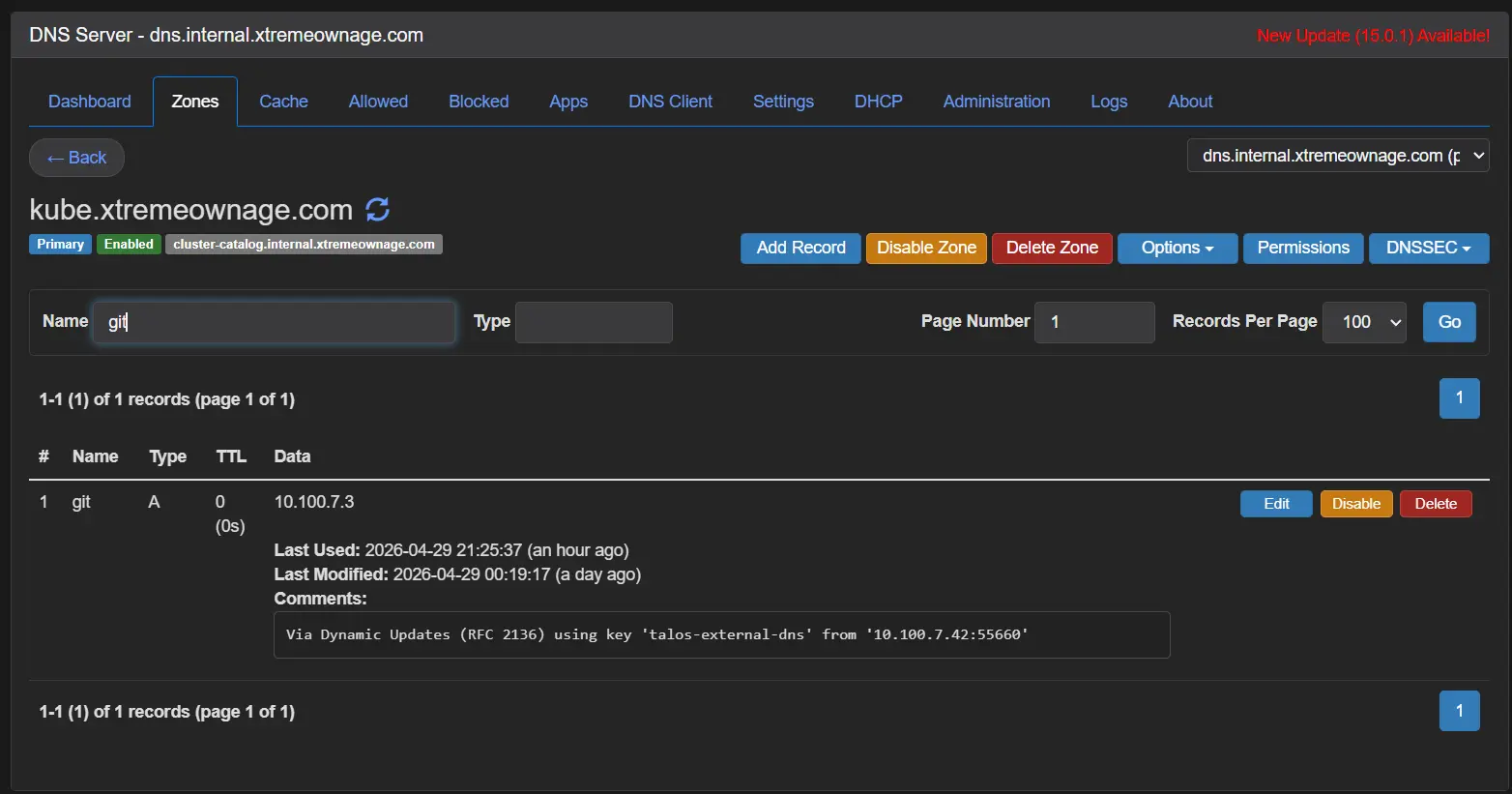
Looking in Technitium, we can see the record was created.
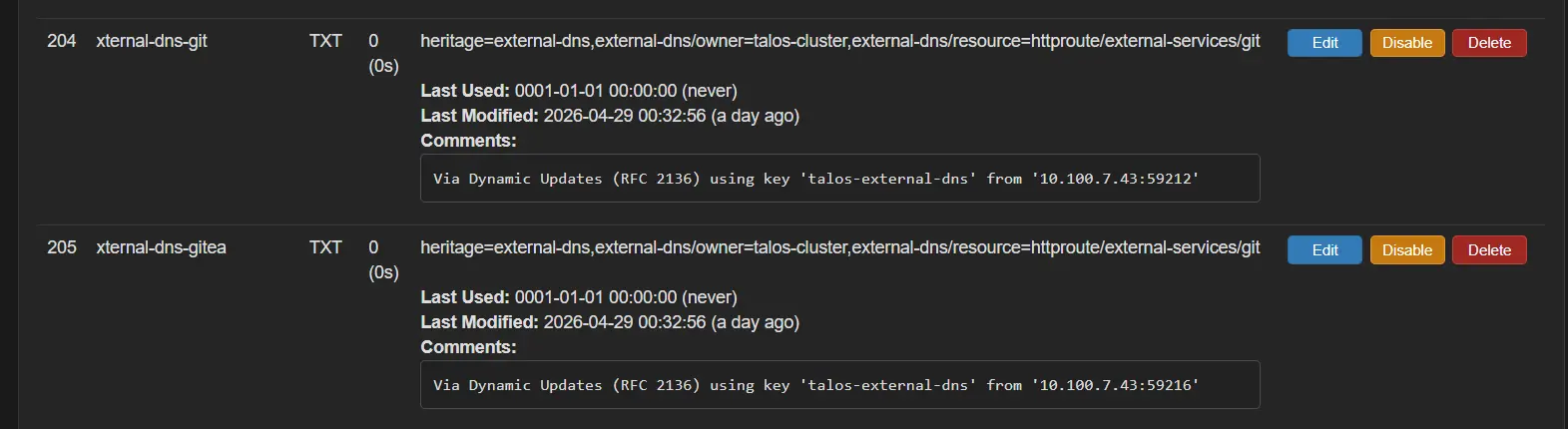
The TXT records have also been created. These are used to verify ownership.
Finally, DNS is indeed resolving for both servers in the cluster.
root@remote:~# nslookup git.kube.xtremeownage.com 192.168.5.128
Server:         192.168.5.128
Address:        192.168.5.128#53

Name:   git.kube.xtremeownage.com
Address: 192.168.7.3

root@remote:~# nslookup git.kube.xtremeownage.com 192.168.5.129
Server:         192.168.5.129
Address:        192.168.5.129#53

Name:   git.kube.xtremeownage.com
Address: 192.168.7.3
Testing HTTP
Testing to ensure the service returns the expected content.
root@remote:~# wget https://git.kube.xtremeownage.com && cat index.html | head -n 10
--2026-04-29 22:19:39--  https://git.kube.xtremeownage.com/
Resolving git.kube.xtremeownage.com (git.kube.xtremeownage.com)... 192.168.7.3
Connecting to git.kube.xtremeownage.com (git.kube.xtremeownage.com)|192.168.7.3|:443... connected.
HTTP request sent, awaiting response... 200 OK
Length: unspecified [text/html]
Saving to: 'index.html.2'

index.html.2                                        [ <=>                                                                                                 ]  13.49K  --.-KB/s    in 0s

2026-04-29 22:19:40 (68.3 MB/s) - 'index.html.2' saved [13812]

<!DOCTYPE html>
<html lang="en-US" data-theme="gitea-auto">
<head>
        <meta name="viewport" content="width=device-width, initial-scale=1">
        <title>Gitea: Git with a cup of tea</title>
        <link rel="manifest" href="data:application/json;base64,eyJuYW1lIjoiR2l0ZWE6IEdpdCB3aXRoIGEgY3VwIG9mIHRlYSIsInNob3J0X25hbWUiOiJHaXRlYTogR2l0IHdpdGggYSBjdXAgb2YgdGVhIiwic3RhcnRfdXJsIjoiaHR0cHM6Ly9naXQua3ViZS54dHJlbWVvd25hZ2UuY29tLyIsImljb25zIjpbeyJzcmMiOiJodHRwczovL2dpdC5rdWJlLnh0cmVtZW93bmFnZS5jb20vYXNzZXRzL2ltZy9sb2dvLnBuZyIsInR5cGUiOiJpbWFnZS9wbmciLCJzaXplcyI6IjUxMng1MTIifSx7InNyYyI6Imh0dHBzOi8vZ2l0Lmt1YmUueHRyZW1lb3duYWdlLmNvbS9hc3NldHMvaW1nL2xvZ28uc3ZnIiwidHlwZSI6ImltYWdlL3N2Zyt4bWwiLCJzaXplcyI6IjUxMng1MTIifV19">
        <meta name="author" content="Gitea - Git with a cup of tea">
        <meta name="description" content="Gitea (Git with a cup of tea) is a painless self-hosted Git service written in Go">
        <meta name="keywords" content="go,git,self-hosted,gitea">
        <meta name="referrer" content="no-referrer">
How to use it / How does it work
When you need to add or remove a record, make the changes to manifests\networking\external-services\chart\values.yaml and commit to your git repo.
Within a few minutes (or seconds, if you configured argo with a webhook), Argo will create the required CRDs in your cluster, and the external DNS records will be provisioned.
This all works due to-
- Argo handles applying changes to your kubernetes cluster.
- External DNS scans configured resource types, and handles provisioning, or deprovisioning the records in your DNS solution.
That's- basically it. The setup might not be simple, but, using the solution is about as easy as it gets.
Why on earth would you do all of this for a reverse proxy!!!! nginxproxymanager / haproxy / etc exists!!!!
I prefer having as much of my lab configuration as possible done via stateful, source-controlled manifests.
Terraform / Ansible are taking care of provsioning my infrastructure, and installing my applications.
A large portion of my application configuration is now in kubernetes manifests.
Getting my reverse proxy configuration done was the next logical step!