
Attic fan automation
Introduction
Info
This post was originally published in 2021, and has been adopted to this static-site from wordpress.
So, my house has an attic-fan. For those who don't know what an attic-fan is… Imagine a very large fan which sucks a huge volume of air through the house, and sends it out through the attic.
These fans are amazing during this time of the year, because you can quickly suck large volumes of cooler, outside air into the house, efficiently cooling the house down without needing to run the central HVAC.
A month or so ago, I replaced the 50 year old attic-fan timer, with a simple Shelly 1PM. This allows me to remotely trigger the attic fan on, or off, and integrates everything into Home Assistant for me.
The purpose of this article, is to go over the automation I put into place to make it nearly completely automated.
Part One - The Dashboard
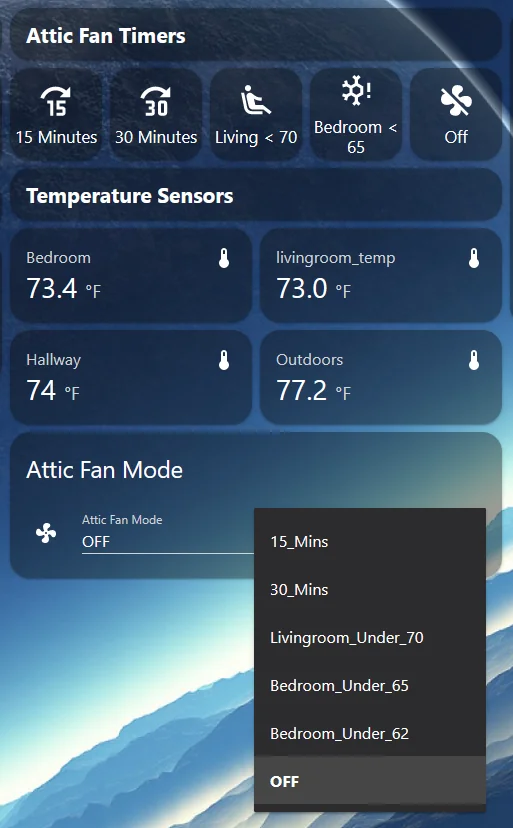
I made a very simple dashboard for triggering the attic fan. At the top, you have instance access to buttons for running the fan for a predetermined duration of time, running the system until the living-room is below 70 degrees, or, running the system until the bedroom is below 65 degrees.
As well, I add a panel to show the temp sensors from those areas, along with the outdoor temp.
Each of the buttons at the top, performs a call to input_select.select_option, which then updates the value of a input_select entity I named, “Attic Fan Mode”
I originally attempted the various automatons using scripts inside of home assistant, however, each additional scenario caused the complexity of the script to raise higher and higher. While this could be done easier using templates, I wanted something that was very simple, straightforward to look at, update, and utilize.
So, I chose node-red.
Automation #1 - Turn off HVAC when Attic-Fan is turned on.

The first automation, is simple. When the attic fan is running, it sets the HVAC_MODE for my thermostat, to “off”.
This is a requirement, as when its 40 degrees outside and you are running the attic fan, this would easily cool the central thermostat below its configured set point, causing your heater to run while you are attempting to cool the house down.
Now- I did find out, turning the thermostat on and off, was not AS simple as just calling climate.turn_off, or climate.turn_on. Instead, when the attic fan turns on, I first query the current hvac_mode of the thermostat, and hold onto this value. Then, I up the hvac_mode to “Off”. Afterwards, we wait for the attic fan to turn off. After it has successfully turned off, I call climate.set_hvac_mode= the previously captured value.
In my case, calling climate.turn_on would cause the thermostat to end up in “automatic” mode, instead of the previously configured heating or cooling mode.
Automation #2 - Different various “Modes”
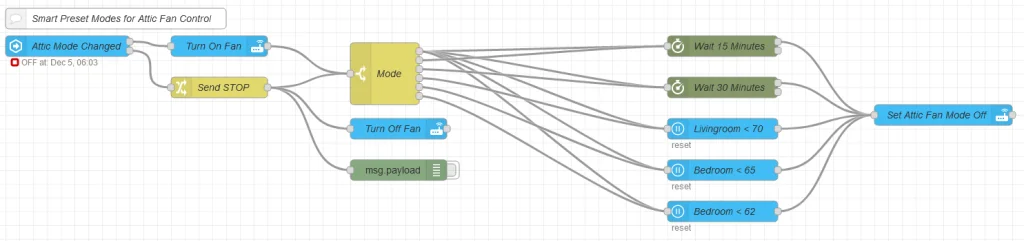
The above image contains all of the various “Attic Fan Mode” values I defined up above, as well as logic for resetting the timers.
The first node, will be triggered when the state is changed. If the state is set to “Off”, it exits through the bottom, which sends a Stop message that is propagated to the wait timers down the chain. This is useful, because if you manually turn the attic_fan off, this will automatically reset the timers.
For the switch mode- it is configured with each of the various “Modes” along with a node matching “STOP”
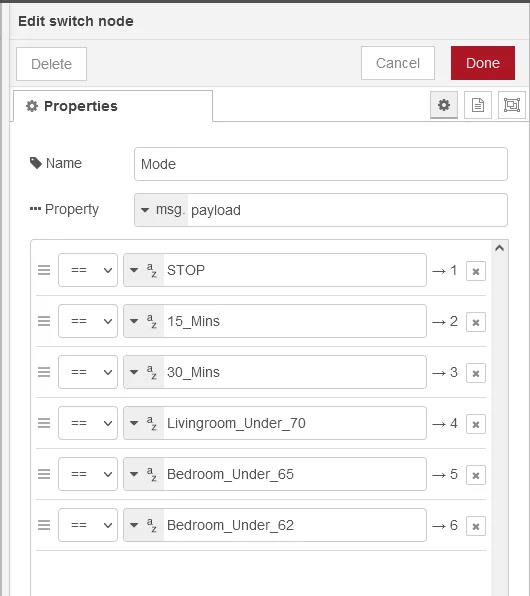
The rest, is quite simple.
The timers simply start a timer within node red… and, the temp-specific modes will wait until the condition has been achieved for two minutes before turning the mode selector back to “Off”.
That is basically it. Nothing overly complex.
A few have expressed concern regarding the timer being non-persistent. In my case, the uptime for either home assistant or node-red for me is usually measured in months. As well, since the fan is quite audible when running, it is not likely that I would not notice it has been running for longer then I would have expected. So, in the rare event the timer was interrupted, I could simply turn the fan back to off.
If you have questions/comments/complaints, post em below.
For anyone wanting to know the ESPHome configuration used- here it is.
substitutions:
  devicename: "attic_fan"
  friendly_name: "Attic Fan"
  ip_address:
  gateway:
  <<: !include secrets.yaml

<<: !include config/common.yaml

esphome:
  name: ${devicename}
  platform: ESP8266
  board: esp01_1m

time:
  - platform: homeassistant
    id: homeassistant_time

sensor:
  - platform: hlw8012
    cf_pin: GPIO05
    cf1_pin: GPIO13 # not used because it is not available on the 1PM but it is needed to compile
    sel_pin: GPIO14 # not used because it is not available on the 1PM but it is needed to compile
    power:
      name: "${friendly_name} Watts"
      unit_of_measurement: W
      id: "${devicename}_power"
      icon: mdi:flash-circle
      accuracy_decimals: 1
      filters:
      # Map from sensor -> measured value
      - calibrate_linear:
          - 0.0 -> 1.0
          - 110.33186 -> 20.62
          - 131.01909 -> 24.32
          - 341.33920 -> 62.08
          - 5561.41553 -> 1000.0
          - 2975.51221 -> 535.7
          - 9612.66309 -> 1720.0
          - 14891.35352 -> 2679.0
      # Make everything below 2W appear as just 0W.
      # Furthermore it corrects 1.0W for the power usage of the plug.
      - lambda: if (x < (2 + 1)) return 0; else return (x - 1);
    update_interval: 3s
  # Wifi Signal Sensor
  - platform: wifi_signal
    name: "${devicename} WiFi Signal"
    update_interval: 60s
  # NTC Temperature
  - platform: ntc
    sensor: temp_resistance_reading
    name: ${devicename} Temperature
    unit_of_measurement: "°C"
    accuracy_decimals: 1
    icon: "mdi:thermometer"
    calibration:
      b_constant: 3350
      reference_resistance: 10kOhm
      reference_temperature: 298.15K
    on_value_range:
      - above: 85.0
        then:
          # - light.turn_off: lightid1
          # - fan.turn_off: fanid1
          - homeassistant.event:
              event: esphome.overheat
              data:
                title: ${devicename} has overheated.
  - platform: resistance
    id: temp_resistance_reading
    sensor: temp_analog_reading
    configuration: DOWNSTREAM
    resistor: 32kOhm
  - platform: adc
    id: temp_analog_reading
    pin: A0

switch:
  - platform: gpio
    name: ${friendly_name}
    icon: "mdi:ceiling-light"
    pin: GPIO15
    id: relay

output:
  # Relay state led
  - platform: esp8266_pwm
    id: state_led
    pin:
      number: GPIO00
      inverted: true
Closing Notes
While, I could have used a variable to track the minutes of remaining runtime to make this persistent in the event one of my containers had to restart, and, I could have also created a variable to allow the set-point to be easily configured- I don't think it would ever be touched.
So, this one is simple, fit for purpose, fit for use. When I run the attic fan, its usually just for the purpose of quickly cooling down my bedroom for going to sleep, or sucking warm air out of the living areas.
As such, the few simple cases I chose to automate, will encompass pretty much every case I leverage the fan for. However, If I do find a new use-case, I will be sure to automate it.
Another scenario I did consider automating- was to turn the attic fan off when the fire-detector is triggered. Since, my detectors are z-wave based, and I do have those integrated into home assistant- I choose to not do this.
Why?
For a few reasons.
#1 - The attic fan generally runs for a short duration, at very specific times. Since, you DO have to open windows and/or doors for the air to be directed into the proper room, this isn't something I have plans to fully automate at this time.
#2 - 100% of the time so far when my fire detectors have triggered- was due to me cooking. In the scenario where my cooking is so bad that the fire detector is triggered, I actually want to leverage the attic-fan to suck fresh air into the house. If the fan were automated to where it shut off when a fire was detected- this would not be possible.
#3 - Back during the cold snap earlier this year, I had a generator running outdoors. Well, turns out, the carbon monoxide found a way into my home. Thankfully, my Z-Wave Detectors alerted me to the carbon monoxide situation. In this case, I leverage the attic fan to pull in plenty of fresh (and frigid) air into the house as well.