
I use two Kincony N30s for per-circuit energy monitoring. They came with a few quirks. The energy counters on mine were full of garbage, and the only tool Kincony provides to fix it…. is Windows only.
So…. with a bit of help from Claude, we created a python script to flash these from Linux. As…. I have no Microsoft whatsoever, remaining in my household.
This was completed October 17, 2026
Sorry, I am running behind on my documentation!
The N30 is really two computers on one board. An ESP32-S3 (which runs ESPHome), and a separate ARM CPU that runs the three BL0910 energy chips and answers Modbus.
The energy counters on mine were full of garbage (one circuit showed 2.7 billion kWh), and the coils that are supposed to clear them did nothing. Fixing that requires updating the ARM CPU's firmware, and Kincony's flashing tool is a Windows program. So, I wrote a small Python port of it.
TL;DR
- Wire a USB-RS485 adapter to the N30's RS485 A/B terminals (USB-C only reaches the ESP32).
- Run
kc_flash.py --port /dev/ttyUSB0 --window 300 N10203060_KU_V20_260324SP.bin. - Cut the N30's power. Hold the ESP32's BOOT/DL button, restore power, release after ~2 seconds.
- Wait for
Download finished begin running. - Clear the energy counters with Modbus coils 520 / 521 / 522.
Two issues to be aware of:
- The ESP32 has to be kept out of the way while the ARM bootloader is receiving data. Holding BOOT/DL at power-up parks it in ROM download mode.
- The last packet must be 1034 bytes, not the 1035 bytes Kincony's own tool sends. With the extra byte, the bootloader hung on the final packet in each of my attempts. The script sends 1034 bytes by default.
And one wiring issue, once it's installed:
- L and N are backwards on bank 1's voltage input. If every bank 1 channel reads negative watts, swap L and N on bank 1's voltage terminals. Details are in Kincony N30 - ESPHome Configuration and Modbus Reference.
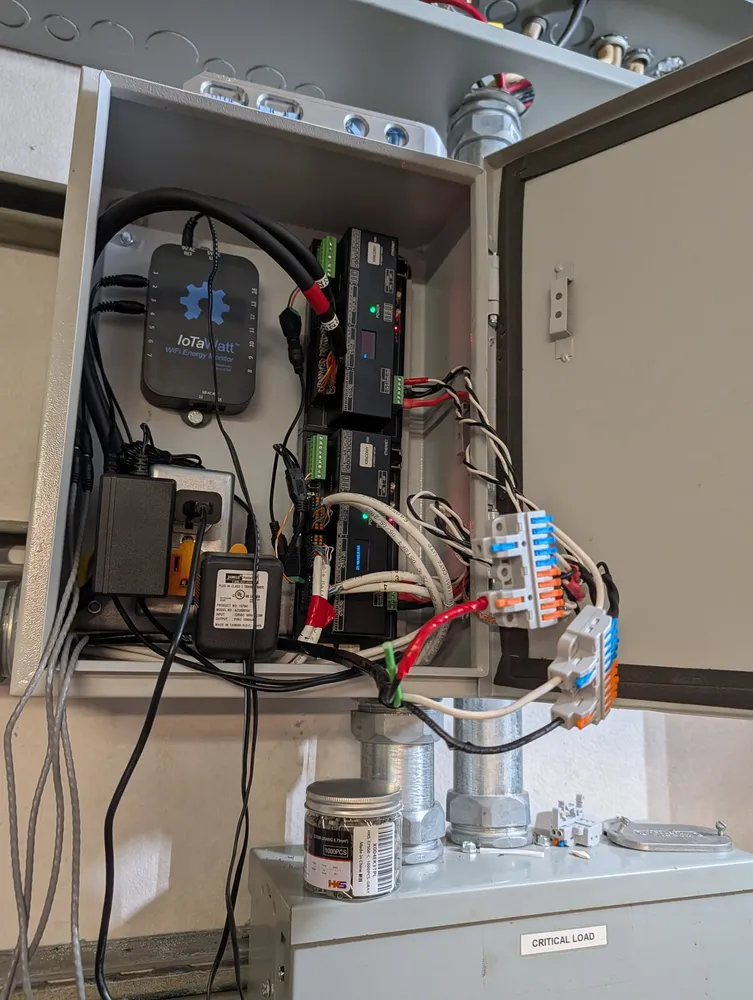
Here are mine, installed. The two black DIN modules to the right of the IotaWatt are both N30s.
Why update the firmware?
The N30 exposes Modbus coils to clear the energy counters:
| Coil | Function |
|---|---|
| 520-522 | Clear all energy on chip 1 / 2 / 3 |
| 526-555 | Clear individual channels |
| 586-588 | Clear the “sum” counter on each chip |
On older ARM firmware, these coils send back a normal Modbus echo, but do not clear anything. You need ARM firmware V20_260305SP or newer. As of writing, the newest is V20_260324SP, which also fixes energy data not being remembered across a power loss.
- Firmware + Kincony's Windows tool: Kincony forum - N60 N30 N20 N10 ARM CPU firmware V20_260324SP
- Register map: Kincony forum - N30 Energy RS485 Modbus Protocol
I'm not re-hosting the firmware. Grab it from Kincony's thread. The file I used:
N10203060_KU_V20_260324SP.bin   27,860 bytes
sha256 5648cbe5a72652f3a8a8cb18e1ce5f728a00eb558433fd5e37c6613d7bc06621
What you need
- A USB to RS485 adapter. I used a Waveshare USB to RS485 adapter, which shows up as
/dev/ttyUSB0. Amazon - Waveshare USB to RS4851 - Python 3 with
pyserial. - Your user in the group that owns the serial device (
uucpon Arch/CachyOS,dialouton Debian/Ubuntu). - Access to the N30's main power (its hard-wired supply, not USB-C), and to its BOOT/DL button.
Don't hold RST
The N30's RST button belongs to the ARM CPU. Tapping it does not enter the bootloader, and holding it for 3 seconds restores the ARM's factory settings. The button you want is the ESP32's BOOT/DL.
Wiring
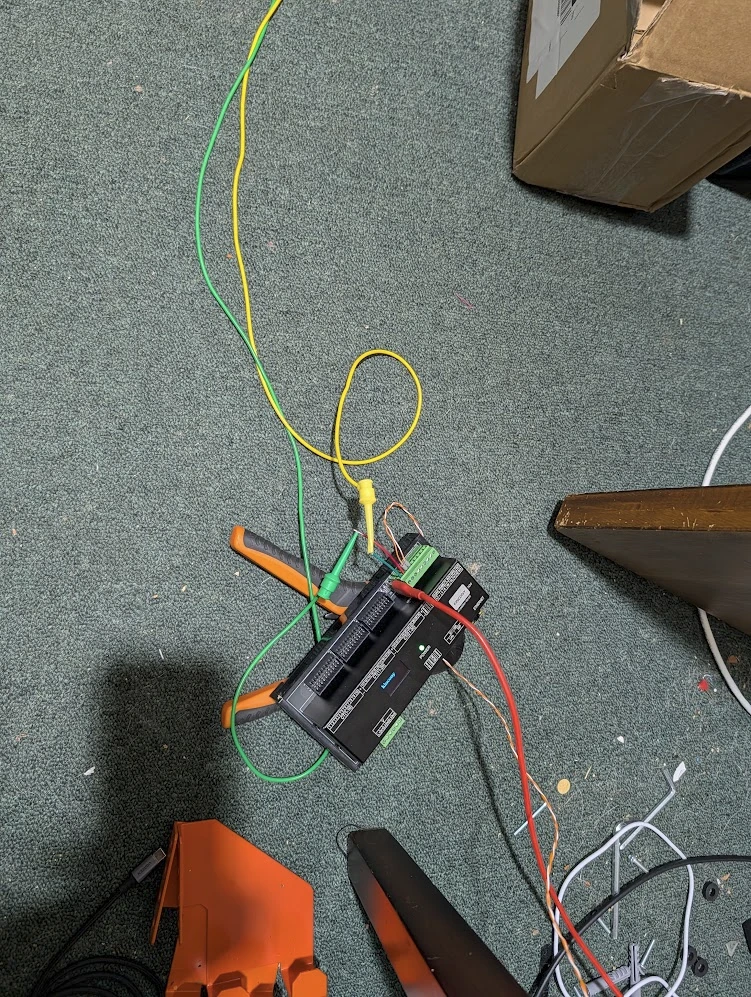
Adapter A to N30 A, adapter B to N30 B. If nothing answers, swapping A/B is harmless.
The N30 doesn't need to be installed for this. Here is my setup, on the floor:
Sanity check, with the board powered and running: a plain Modbus read of chip 1's first current register (address 1, 38400 8N1, function 3, register 100) should answer.
fc=3 baud= 38400 tx=01 03 00 64 00 02 85 d4 rx=01 03 04 00 00 00 00 fa 33
If you get nothing back, fix that first. My first attempt failed because the board wasn't powered.
The flasher
This is a Linux port of KC868 Controller Bootloader.exe, rebuilt from the decompiled .NET tool. The protocol:
| Frame | Bytes |
|---|---|
| Enter bootloader | 7E 7E 5A 00 B4 42 |
| Data packet | 7E 7E 5A 01 <idx hi lo> <count hi lo> <1024 data> <crc hi lo> |
| Run application | 7E 7E 5A 02 75 C3 |
| ACK | 2B 4F 4B CF 75 (+OK + crc) |
| NAK | 2D 45 52 52 00 A4 (-ERR ...) |
The CRC is CRC16/MODBUS over the first 1032 bytes, sent high byte first (backwards from normal Modbus). The firmware is sent as 1 KB packets; the last one is zero-padded. The bootloader runs at 38400 baud.
The workflow, matching the vendor tool:
- Send “enter bootloader” every 100 ms, while you power-cycle the board. The bootloader only listens for a moment right after power-on.
- Send each packet, wait for
+OK, send the next. Retry on timeout. - Send “run application”.
Options you might need:
| Option | Default | What it does |
|---|---|---|
--window |
300 | Seconds to keep trying to enter the bootloader. |
--timeout |
15 | Seconds to wait for each packet's ACK. |
--pad-last |
off | Send the final packet as 1035 bytes like the vendor tool. Don't, see below. |
--no-ping |
off | Skip the single “are you still there?” check before packet 0 and after a timeout. |
--dry-run |
Just build and print the packets. |
kc_flash.py
#!/usr/bin/env python3
"""Linux port of "KC868 Controller Bootloader.exe" (Kincony ARM CPU IAP tool).

Protocol reproduced byte-for-byte from the decompiled .NET tool:
  enter bootloader : 7E 7E 5A 00 B4 42
  run application  : 7E 7E 5A 02 75 C3
  data packet      : 7E 7E 5A 01 <idx hi lo> <count hi lo> <1024 data> <crc hi lo>
                     CRC16/MODBUS over the first 1032 bytes, sent high byte first.
                     Last (partial) packet is zero padded. The original tool sends it as
                     1035 bytes (one extra 0x00); that hung the bootloader every time on
                     2026-10-17, so this script sends 1034 by default (--pad-last restores
                     the vendor behaviour).
  device ACK       : 2B 4F 4B CF 75   ("+OK" + crc)
  device NAK       : 2D 45 52 52 00 A4 ("-ERR" ...)

Usage:
  kc_flash.py --dry-run FIRMWARE.bin
  kc_flash.py --port /dev/ttyUSB0 --window 300 FIRMWARE.bin

N30 notes:
  - Connect a USB-RS485 adapter to the N30 RS485 A/B terminals (USB-C only reaches the ESP32).
  - Start the script, then cut and restore the N30's hard-wired power supply. Tapping RST does
    not enter the bootloader (and holding RST 3 s factory-resets the ARM CPU).
  - Hold the ESP32's BOOT/DL button while power comes back (release after ~2 s). That parks
    the ESP32 in its ROM download mode so its Modbus polling can't disturb the ARM bootloader.
  - If a flash is left incomplete, the bootloader stays resident: re-running the script then
    connects immediately, no power cycle needed.
  - After flashing, energy can be cleared with coils 520/521/522 (buttons in n30.yaml).
"""
import argparse
import sys
import time

BOOT_CMD = bytes([126, 126, 90, 0, 180, 66])
APP_CMD = bytes([126, 126, 90, 2, 117, 195])
ACK = bytes([43, 79, 75, 207, 117])
NAK = bytes([45, 69, 82, 82, 0, 164])
BAUD = 38400
RETRIES = 5
TIMEOUT = 5.0  # tool's timer1 interval


def crc16_modbus(data: bytes) -> int:
    crc = 0xFFFF
    for b in data:
        crc ^= b
        for _ in range(8):
            crc = (crc >> 1) ^ 0xA001 if crc & 1 else crc >> 1
    return crc


def build_packets(fw: bytes, pad_last: bool = False) -> list[bytes]:
    full, rem = divmod(len(fw), 1024)
    count = full + (1 if rem else 0)
    packets = []
    for idx in range(count):
        chunk = fw[idx * 1024:(idx + 1) * 1024]
        body = bytearray(1032)
        body[0:4] = b"\x7e\x7e\x5a\x01"
        body[4:6] = idx.to_bytes(2, "big")
        body[6:8] = count.to_bytes(2, "big")
        body[8:8 + len(chunk)] = chunk
        crc = crc16_modbus(body)
        pkt = bytes(body) + crc.to_bytes(2, "big")
        if len(chunk) < 1024 and pad_last:
            pkt += b"\x00"  # original tool sends the short packet as 1035 bytes
        packets.append(pkt)
    return packets


def wait_reply(ser, timeout=TIMEOUT, raw=None):
    """Return 'ack', 'nak' or None (timeout). Scans the stream for either frame.
    If raw is a bytearray, every received byte is appended to it (for debugging)."""
    buf = bytearray()
    deadline = time.monotonic() + timeout
    while time.monotonic() < deadline:
        b = ser.read(1)
        if not b:
            continue
        if raw is not None:
            raw += b
        buf += b
        if buf.endswith(ACK):
            return "ack"
        if buf.endswith(NAK):
            return "nak"
        del buf[:-8]
    return None


T0 = time.monotonic()


def log(msg):
    print(f"[{time.monotonic() - T0:7.2f}s] {msg}")


def ping(ser):
    """Send one detect frame and report whether the bootloader still answers.
    Only call between packets, never while the bootloader is mid-frame."""
    ser.reset_input_buffer()
    ser.write(BOOT_CMD)
    raw = bytearray()
    r = wait_reply(ser, 1.0, raw=raw)
    log(f"ping: {r or 'no reply'}  rx={raw.hex(' ') or '(nothing)'}")
    return r == "ack"


def enter_bootloader(ser, window, bauds, settle):
    print(f"Sending bootloader-detect every 100 ms for {window:.0f} s, alternating baud {bauds}.")
    print(">>> NOW disconnect and reconnect the N30's power supply (tapping RST may not work). <<<")
    deadline = time.monotonic() + window
    i = 0
    while time.monotonic() < deadline:
        ser.baudrate = bauds[i % len(bauds)]
        i += 1
        ser.reset_input_buffer()
        ser.write(BOOT_CMD)
        r = wait_reply(ser, 0.1)
        if r == "ack":
            log(f"goto bootloader ok at {ser.baudrate} baud")
            if settle:
                log(f"waiting {settle:.1f} s before sending data")
                time.sleep(settle)
            ser.reset_input_buffer()
            return True
        if r == "nak":
            print(f"bootloader replied ERR at {ser.baudrate}, retrying")
    return False


def main():
    ap = argparse.ArgumentParser()
    ap.add_argument("firmware")
    ap.add_argument("--port")
    ap.add_argument("--dry-run", action="store_true")
    ap.add_argument("--window", type=float, default=300.0, help="seconds to keep trying bootloader detect")
    ap.add_argument("--no-run", action="store_true", help="don't send the run-application command at the end")
    # 38400 only by default: detect frames sent at other rates arrive as garbage and can
    # leave the bootloader's packet framing misaligned (every packet then times out).
    ap.add_argument("--bauds", default="38400", help="comma list of baud rates to try for bootloader detect")
    ap.add_argument("--gap", type=float, default=0.1, help="seconds to pause after each ACK before the next packet")
    ap.add_argument("--settle", type=float, default=0.0, help="seconds to stay silent after the bootloader ACKs detect")
    ap.add_argument("--timeout", type=float, default=15.0, help="seconds to wait for each packet's ACK")
    ap.add_argument("--first-timeout", type=float, default=60.0, help="seconds to wait for packet 0's ACK")
    ap.add_argument("--pad-last", action="store_true",
                    help="send the final short packet as 1035 bytes like the vendor tool (hung the bootloader here)")
    ap.add_argument("--no-ping", action="store_true", help="don't ping the bootloader before packet 0 / after a timeout")
    args = ap.parse_args()

    fw = open(args.firmware, "rb").read()
    packets = build_packets(fw, args.pad_last)
    print(f"firmware {len(fw)} bytes -> {len(packets)} packets")

    if args.dry_run:
        for i, p in enumerate(packets):
            print(f"  pkt {i:2d}: len={len(p)} hdr={p[:8].hex(' ')} crc={p[1032:1034].hex(' ')}")
        return 0

    if not args.port:
        ap.error("--port required unless --dry-run")
    import serial

    bauds = [int(b) for b in args.bauds.split(",")]
    with serial.Serial(args.port, bauds[0], bytesize=8, parity="N", stopbits=1, timeout=0.05) as ser:
        if not enter_bootloader(ser, args.window, bauds, args.settle):
            print("No bootloader response. Check A/B wiring, adapter, and RST timing.")
            return 1
        if not args.no_ping and not ping(ser):
            log("Bootloader stopped answering right after detect.")
            return 1

        for i, pkt in enumerate(packets):
            for attempt in range(1, RETRIES + 1):
                ser.reset_input_buffer()
                ser.write(pkt)
                raw = bytearray()
                # Generous timeouts: resending or pinging before a late ACK arrives would
                # desync the bootloader. Packet 0 normally ACKs in ~0.3 s.
                r = wait_reply(ser, args.first_timeout if i == 0 else args.timeout, raw=raw)
                if r == "ack":
                    log(f"Download {i + 1}K  progress {i + 1}/{len(packets)}"
                        + (f"  (attempt {attempt})" if attempt > 1 else ""))
                    time.sleep(args.gap)
                    break
                log(f"packet {i}: {'ERR' if r == 'nak' else 'timeout'} (attempt {attempt}/{RETRIES})"
                    f"  rx={raw.hex(' ') or '(nothing)'}")
                if not args.no_ping and not ping(ser):
                    log("Bootloader no longer answers; power-cycle the board and re-run.")
                    return 1
            else:
                log("Download failed. Power-cycle the board and re-run this script.")
                return 1

        log("Data send complete")
        if args.no_run:
            return 0
        ser.reset_input_buffer()
        ser.write(APP_CMD)
        r = wait_reply(ser)
        log("Download finished begin running" if r == "ack" else f"run command reply: {r}")
    return 0


if __name__ == "__main__":
    sys.exit(main())
Flashing it
1. Dry run
$ python3 kc_flash.py --dry-run N10203060_KU_V20_260324SP.bin
firmware 27860 bytes -> 28 packets
  pkt  0: len=1034 hdr=7e 7e 5a 01 00 00 00 1c crc=60 e6
  pkt  1: len=1034 hdr=7e 7e 5a 01 00 01 00 1c crc=a1 71
  ...
  pkt 26: len=1034 hdr=7e 7e 5a 01 00 1a 00 1c crc=c5 36
  pkt 27: len=1034 hdr=7e 7e 5a 01 00 1b 00 1c crc=ee 8e
28 packets, each 1034 bytes, including the last one.
2. Start the flasher, then power-cycle with BOOT/DL held
python3 kc_flash.py --port /dev/ttyUSB0 --window 300 N10203060_KU_V20_260324SP.bin
While it is sending the bootloader command:
- Cut the N30's main power.
- Press and hold the ESP32's BOOT/DL button.
- Restore power, keep holding for about 2 seconds, then release.
3. The successful run
This is the run that worked. The bootloader was already resident from a previous incomplete attempt, so it connected without a power cycle (and I'd passed --window 30 for that reason).
firmware 27860 bytes -> 28 packets
Sending bootloader-detect every 100 ms for 30 s, alternating baud [38400].
>>> NOW disconnect and reconnect the N30's power supply (tapping RST may not work). <<<
[   0.06s] goto bootloader ok at 38400 baud
[   0.07s] ping: ack  rx=2b 4f 4b cf 75
[   0.38s] Download 1K  progress 1/28
[   0.78s] Download 2K  progress 2/28
[   1.18s] Download 3K  progress 3/28
[   1.59s] Download 4K  progress 4/28
[   1.99s] Download 5K  progress 5/28
[   2.39s] Download 6K  progress 6/28
[   2.80s] Download 7K  progress 7/28
[   3.21s] Download 8K  progress 8/28
[   3.61s] Download 9K  progress 9/28
[   4.02s] Download 10K  progress 10/28
[   4.43s] Download 11K  progress 11/28
[   4.83s] Download 12K  progress 12/28
[   5.24s] Download 13K  progress 13/28
[   5.64s] Download 14K  progress 14/28
[   6.04s] Download 15K  progress 15/28
[   6.44s] Download 16K  progress 16/28
[   6.85s] Download 17K  progress 17/28
[   7.26s] Download 18K  progress 18/28
[   7.66s] Download 19K  progress 19/28
[   8.07s] Download 20K  progress 20/28
[   8.47s] Download 21K  progress 21/28
[   8.87s] Download 22K  progress 22/28
[   9.27s] Download 23K  progress 23/28
[   9.67s] Download 24K  progress 24/28
[  10.07s] Download 25K  progress 25/28
[  10.48s] Download 26K  progress 26/28
[  10.88s] Download 27K  progress 27/28
[  11.28s] Download 28K  progress 28/28
[  11.38s] Data send complete
[  11.42s] Download finished begin running
About 11 seconds, start to finish.
Verifying
The new firmware answers Modbus straight away:
fc=3 baud= 38400 tx=01 03 00 64 00 02 85 d4 rx=01 03 04 00 00 00 00 fa 33
Reading all three chips, the kWh counters were still the same garbage:
chip1: V=0.00 Hz=9.53
   A  =[0.0, 0.0, 0.0, 0.0, 0.0, 0.0, 0.0, 0.0, 0.0, 0.0]
   W  =[0.0, 0.0, 0.0, 0.0, 0.0, 0.0, 0.0, 0.0, 0.0, 0.0]
   kWh=[0, 1090561280, 838871076, 654794752, 2147496704, 2868908915, 0, 42240, 2768240640, 0, 42240]
chip2: V=0.00 Hz=9.53
   A  =[0.0, 0.0, 0.0, 0.0, 0.0, 0.0, 0.0, 0.0, 0.0, 0.0]
   W  =[0.0, 0.0, 0.0, 0.0, 0.0, 0.0, 0.0, 0.0, 0.0, 0.0]
   kWh=[0, 33596672, 3774879013, 0, 1879090432, 2348812144, 118753536, 570476800, 117440576, 0, 42240]
chip3: V=0.00 Hz=9.53
   A  =[0.0, 0.0, 0.0, 0.0, 0.0, 0.0, 0.0, 0.0, 0.0, 0.0]
   W  =[0.0, 0.0, 0.0, 0.0, 0.0, 0.0, 0.0, 0.0, 0.0, 0.0]
   kWh=[0, 42240, 2768240640, 0, 42240, 2768240640, 0, 42240, 2768240640, 0, 42240]
Then write coils 520, 521, and 522 (function 5, value FF 00). The N30 echoes each one back:
coil 520: tx=01 05 02 08 ff 00 0c 40 rx=01 05 02 08 ff 00 0c 40
coil 521: tx=01 05 02 09 ff 00 5d 80 rx=01 05 02 09 ff 00 5d 80
coil 522: tx=01 05 02 0a ff 00 ad 80 rx=01 05 02 0a ff 00 ad 80
This time, the counters cleared:
chip1: V=0.00 Hz=9.53
   kWh=[0, 0, 0, 0, 0, 0, 0, 0, 0, 0, 0]
chip2: V=0.00 Hz=9.53
   kWh=[0, 0, 0, 0, 0, 0, 0, 0, 0, 0, 0]
chip3: V=0.00 Hz=9.53
   kWh=[0, 0, 0, 0, 0, 0, 0, 0, 0, 0, 0]
In ESPHome, these coils are template buttons:
button:
  - platform: template
    name: N30_1_clear_energy
    entity_category: config
    on_press:
      - lambda: |-
          id(n30_modbus)->queue_command(modbus_controller::ModbusCommandItem::create_write_single_coil(id(n30_modbus), 520, true));
Failed attempts
It took eleven attempts to get here. The logs from the failed attempts are below, in case you run into the same errors.
Attempt 1: no power
firmware 27860 bytes -> 28 packets
Sending bootloader-detect every 100 ms for 120 s, alternating baud [38400, 115200].
>>> NOW disconnect and reconnect the N30's power supply (tapping RST may not work). <<<
No bootloader response. Check A/B wiring, adapter, and RST timing.
Nothing answered Modbus at any baud either. The board wasn't powered. Once it was, the sanity-check read above came back fine.
Attempts 2 and 5-8: bootloader ACKs, then stops responding on packet 0
firmware 27860 bytes -> 28 packets
Sending bootloader-detect every 100 ms for 120 s, alternating baud [38400, 115200].
>>> NOW disconnect and reconnect the N30's power supply (tapping RST may not work). <<<
goto bootloader ok at 38400 baud
packet 0: timeout (attempt 1/5)
packet 0: timeout (attempt 2/5)
packet 0: timeout (attempt 3/5)
packet 0: timeout (attempt 4/5)
packet 0: timeout (attempt 5/5)
Download failed. Board stays in bootloader; re-run this script to retry.
Things I tried, each costing a power cycle:
- Only send the boot-loader command at 38400 (the original script alternated with 115200, which arrives at the boot-loader as garbage). Kept it, but it wasn't the fix.
- Wait 3 seconds after the ACK before sending anything, in case it was erasing flash. Same result.
- Ping the boot-loader right before packet 0, and again after a timeout:
[  23.20s] goto bootloader ok at 38400 baud
[  23.21s] ping: ack  rx=2b 4f 4b cf 75
[  28.41s] packet 0: timeout (attempt 1/5)  rx=(nothing)
[  29.42s] ping: no reply  rx=(nothing)
[  29.42s] Bootloader no longer answers; power-cycle the board and re-run.
So the boot-loader responds up until it receives packet 0, and then stops responding.
- Wait up to 60 seconds for packet 0's ACK. Nothing:
[  17.90s] goto bootloader ok at 38400 baud
[  17.91s] ping: ack  rx=2b 4f 4b cf 75
[  78.11s] packet 0: timeout (attempt 1/5)  rx=(nothing)
[  79.11s] ping: no reply  rx=(nothing)
[  79.11s] Bootloader no longer answers; power-cycle the board and re-run.
Two other attempts in that stretch:
- Attempt 3 never saw the bootloader at all. The power cycle missed the 2-minute window. The window is now 5 minutes by default.
- Attempt 4 got further, then died ten packets in, about 3 seconds after power-up:
goto bootloader ok at 38400 baud
Download 1K  progress 1/28
...
Download 10K  progress 10/28
packet 10: timeout (attempt 1/5)
packet 10: timeout (attempt 2/5)
packet 10: timeout (attempt 3/5)
packet 10: timeout (attempt 4/5)
packet 10: timeout (attempt 5/5)
Download failed. Board stays in bootloader; re-run this script to retry.
Packet 0: hold the ESP32 in download mode
The ESP32 on the N30 polls the ARM CPU over Modbus. My ESPHome config reads 105 registers every 5 seconds. When you power-cycle the board, the ESP32 boots alongside the ARM and starts polling within a second or two, around the time the bootloader receives its first packet.
Holding the ESP32's BOOT/DL button while power comes back keeps it in ROM download mode, so it does not poll. First try with that:
[   4.86s] goto bootloader ok at 38400 baud
[   4.87s] ping: ack  rx=2b 4f 4b cf 75
[   5.17s] Download 1K  progress 1/28
[   5.58s] Download 2K  progress 2/28
...
[  15.25s] Download 26K  progress 26/28
[  15.65s] Download 27K  progress 27/28
[  30.96s] packet 27: timeout (attempt 1/5)  rx=ff ff ff ff ... (432 x ff) ... ff 23 9c 00 4b 51 2a 2a a4 00
[  31.97s] ping: no reply  rx=a0 a0 a9 97 2f
[  31.97s] Bootloader no longer answers; power-cycle the board and re-run.
27 out of 28 packets, then the last one failed.
Note
I can't prove the ESP32 caused the packet 0 failures. Every failed packet 0 was right after a cold power-up with the ESP32 running, and it never failed once the ESP32 was held in download mode, or when the bootloader was already running before the ESP32 booted.
Attempts 9-10: the last packet hangs the boot-loader
After packet 27, the line filled with ff bytes. The garbled ping reply was identical at every baud rate from 4800 to 115200:
  4800 boot   rx=a0 a0 a9 97 2f
  9600 boot   rx=a0 a0 a9 97 2f
 38400 boot   rx=a0 a0 a9 97 2f
115200 boot   rx=a0 a0 a9 97 2f
Since the reply did not change with the baud rate, it is likely not a real response. My guess is the N30's RS485 transmitter was stuck on, and the adapter was reading back a garbled copy of its own transmission.
Attempt 10 (ESP32 running, boot-loader already resident) failed the same way on packet 27, with 451 ff bytes this time. So this one was reproducible, and not related to the ESP32.
After a power cycle, the boot-loader was still running (no valid application), and a “run application” command was ACKed but nothing ever answered Modbus at any address or baud. The image was incomplete.
Reading Kincony's tool
To see how the vendor tool sends that last packet, I decompiled KC868 Controller Bootloader.exe (it is a small .NET WinForms app, so ILSpy's ilspycmd decompiles it back into C#). The relevant bit:
private void send_data_yu()
{
    byte[] array = new byte[1035];
    // ... header, remaining firmware bytes, zero padding ...
    CRC16 = crc16_modus(array, 1032u);
    array[1032] = (byte)(CRC16 / 256);
    array[1033] = (byte)(CRC16 % 256);
    len = 1035;
    serialPort1.Write(array, 0, len);
}
Every normal packet is 1034 bytes. The last one is allocated as 1035 and sent as 1035, so one stray 0x00 trails the CRC. My script was doing the same.
Attempt 11: drop the extra byte
Sending the last packet as 1034 bytes, like every other packet, worked on the first try. That is the successful log above. The script now does this by default (--pad-last sends 1035 bytes like the vendor tool).
Notes
- If a flash is left half-done, the bootloader stays resident on the next boot. Re-running the script then connects without a power cycle. The ARM stays in the bootloader until it gets a complete image.
- When piping through
tee, the exit code is tee's, not the script's. Useset -o pipefail. - The zero voltage, current, and power (and the odd
Hz=9.53) in the reads above are because the board was sitting on the floor with no CTs or voltage reference connected, not a firmware problem.
Next
The ESPHome configuration, a full Modbus register reference, and the bank 1 L/N issue are in Kincony N30 - ESPHome Configuration and Modbus Reference.
-
Amazon Affiliate Links Used
This post DOES include Amazon affiliate links. If you found this content useful, please consider buying the products displayed using the provided links. You will pay the same amount as normal, however, it does provide a small benefit to me. This benefit is usually used to purchase other products and hardware for which I can review / blog about. I do not display advertisements on this site. As such, the only compensation from this service, comes from affiliate links. I do not ask for, or even accept donations.